MODERN WARFARE 4 / PC FIELD GUIDE
MW4 on Steam:
What You Need
Before You Buy.
Choose your edition. Check your PC. Get past the setup questions and into the game—with clear answers and official sources.
Independent guide · No account needed · Sources checked October 23, 2026
Find your next step
Find a MW4 Steam guide by task
Search these seven guides by topic: price, Vault, PC specs, SSD space, TPM, launch errors or SMS. This searches this page’s guide list.
Matches guide titles and topic terms. Your search stays in this page; it is not saved or sent to analytics.
Showing all 7 guides.
No guide matches this topic. Clear the search to browse all seven guides, or try a shorter topic such as price, TPM or SMS.
MW4 Steam price by edition and region
Check current regional prices and compare the cost of two complete editions.
Open guideMW4 Vault Edition vs Standard
Compare the base game, named Vault extras and requirements for an upgrade.
Open guideMW4 PC system requirements
Compare the published CPU, GPU, RAM, Windows and SSD requirements with your PC.
Open guideMW4 download size and SSD space
Separate download size from the launch SSD baseline and plan the installation drive.
Open guideMW4 Secure Boot and TPM 2.0
Read Windows security states and find the official next step for your hardware.
Open guideMW4 not launching or crashing
Match a launch symptom to file verification, a specific help route or official support.
Open guideMW4 Steam mobile phone number
Find the correct Steam or Activision account route for linking and SMS problems.
Open guide
THE BUYER'S CHECKLIST
Three checks.
A better first session.
Start with the decision in front of you.
Each guide answers one practical question.
Standard or Vault?
See what each edition includes, what the upgrade needs, and which extras matter to you.
Compare editionsCheck the requirements
CPU, GPU, RAM and Windows—plus the security checks for online play.
See PC requirementsGet ready to install
115 GB of free SSD space at launch is a requirement, not an exact download size.
Prepare your SSDYour next step
Build your MW4 Steam preparation checklist
Mark the checks you have completed yourself. Get a short list of what to do before buying or installing.
Choose your entries, then select Show my next steps.
This is a record of your checks, not an automatic compatibility test or a guarantee that the game will run.
Your entries stay in this page while it is open. They are not saved or sent to analytics.
OWNERSHIP AND ONLINE PLAY
How Steam and
Activision accounts fit together.
MW4 on Steam uses two account systems for different tasks. Steam handles your store purchase and game library; online play also requires an Activision account. Before installing, check which Steam account owns the complete game and which Activision account you intend to use. Buying a Vault Upgrade alone does not supply the base game.
Activision confirms crossplay and cross-progression. Online progress belongs to the Activision account and can continue on other platforms linked to that same account. This does not mean a Steam purchase supplies a licence for every other platform. Check ownership separately before buying a second copy or assuming that paid items transfer.
Check the existing Linked Accounts page before making changes. Moving Steam to a different Activision account does not move the original progress, and unlinking normally has a 12-month restriction. Use the account and progression checks to prepare, rather than treating unlinking as a general repair.
Account sources checked : MW4 account registration · Activision account rules.
PRICE IS A REGION-SPECIFIC QUESTION
Check the edition.
Then check the price.
Standard, Vault and the upgrade are different products. Our buying guide explains what to verify before you open the Steam checkout.
MW4 Steam price guideAlready own the base game? Check the Vault Upgrade conditions.
WHEN SETUP GETS IN THE WAY
A warning is a starting point.
Find your next check.
Secure Boot or TPM warning
Start with checks, then use the guide for your PC or motherboard.
Open guideNot launching or crashing
Match the symptom to a sensible next step, without guessing at fixes.
Open guideSteam asks for a phone number
Understand which account needs it and find the official linking help.
Open guide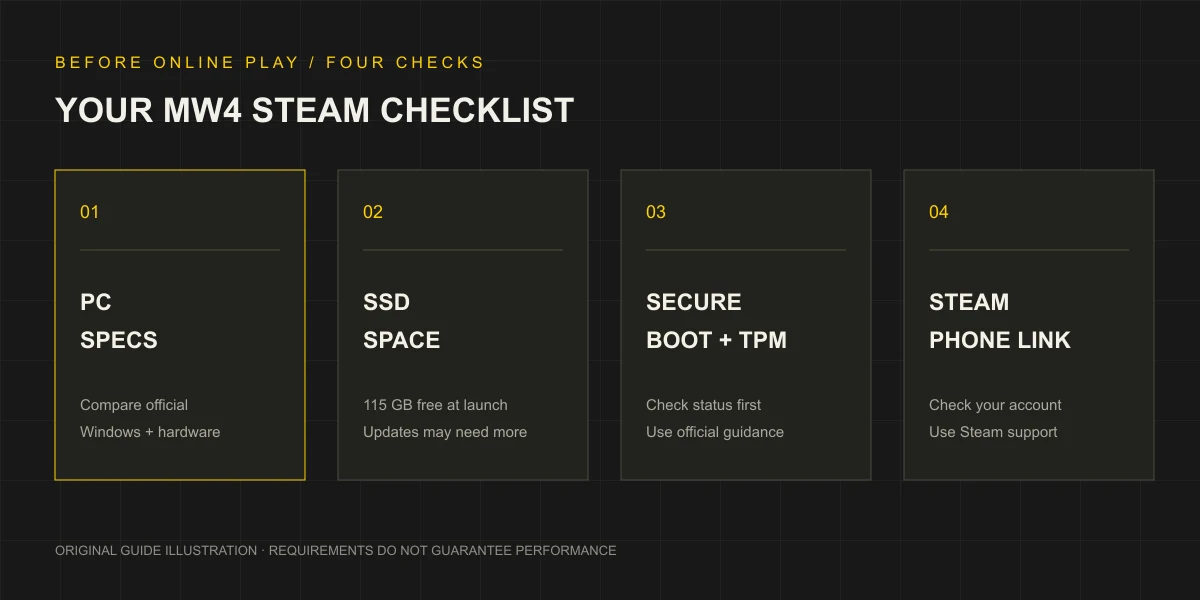 ORIGINAL GUIDE DIAGRAM / NOT A GAME SCREENSHOT
MORE THAN CPU AND GPU
Your pre-flight check
for MW4 on Steam.
Meeting a hardware table is one part of preparation. Storage, online security and the Steam account requirement matter too.
QUICK INTEL
MW4 Steam.
Common questions.
Short answers first.
Details and sources in the guides.
Is MW4 available on Steam?+
Yes. The official Steam product page is Call of Duty: Modern Warfare 4, app ID 4435490. Use the official store to check availability and purchase terms for your account.
Check the Steam buying guideWhich MW4 edition should I choose?+
Start with Standard if you want the base game. Compare the specific cosmetic and seasonal extras before choosing Vault. The Vault Upgrade is a different purchase and requires the base game.
Compare Standard and VaultHow much space does MW4 need?+
Steam lists 115 GB of available space on an SSD at launch. That is not a measured download size, and mandatory updates may require additional space.
Understand download and SSD spaceDo Secure Boot and TPM 2.0 affect online play?+
Activision says players who do not meet these requirements will be restricted from all MW4 online modes. Check your system status before changing BIOS settings.
Check the Steam security warningDo I need an Activision account as well as Steam?+
Online play requires an Activision account. Crossplay and progression use the linked Activision account; this does not establish cross-buy or transfer every paid item. Check the linked accounts before changing anything.
Read the account and progression checksWhy does MW4 ask for a phone number?+
The Steam listing requires a mobile phone number linked to your Steam account. Number eligibility and recovery problems should be checked with Steam support.
Find phone linking helpHOW THIS GUIDE IS MADE
Official sources.
Clear boundaries.
We check Steam, Call of Duty and Activision support before publishing product claims. Editorial advice is identified as advice. We do not invent benchmarks, compatibility verdicts or fixes that have not been tested.
Steam displays a release date of October 22, 2026; the publisher's global launch announcement uses October 23. We retain those source scopes instead of guessing at a single unlock time.