MW4 Steam Guide Terms for Using This Website
mw4steam.com is an independent information site published by MW4 Steam Guide editorial desk. These terms describe use of its articles, links and browser-based tools. The privacy policy explains the associated data handling and optional analytics.
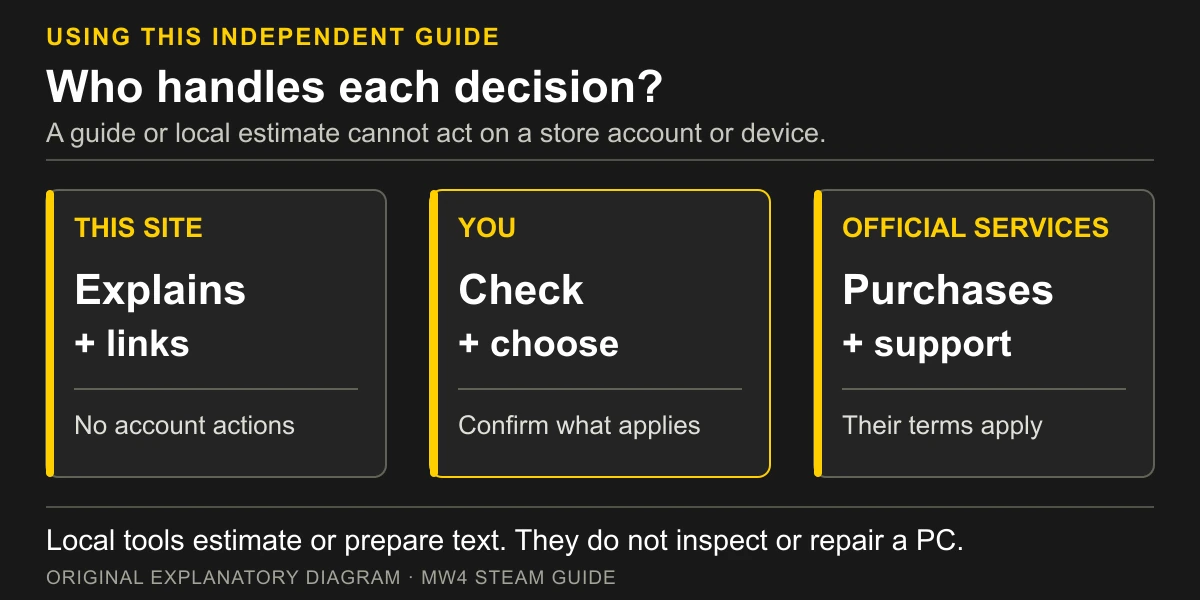
The site provides product research, explanations and troubleshooting suggestions. It does not sell game keys, take payments, hold game licences or operate Steam or Activision accounts. Any purchase, refund request or account change is between you and the relevant provider under that provider’s terms.
You can read the guides without creating a site account or allowing analytics. There is no checkout or account-recovery service here. A link to an official store or help topic is a route to that provider, rather than an order, support case or promise made by this website.
How Responsibilities Are Divided
| Part of the task | What this site provides | What must be checked elsewhere |
|---|---|---|
| Choose a version or examine a price | Published item descriptions, an edition-route helper and a difference calculated from two prices you enter | The current official item, your region, currency, eligibility and checkout total |
| Compare a PC with published requirements | Source-labeled specifications and an explanation of their scope | Your exact components, Windows build, firmware state and the latest applicable official guidance |
| Plan SSD space | Local arithmetic using the published launch reference and your chosen reserve | Actual free drive space, the current installation selection and update requirements |
| Investigate a launch or online-play issue | Symptom-based checks and official support destinations | Whether a step applies to the device and whether the official service can resolve the issue |
| Report a site problem | An editorial email address and a local draft helper | You review and send the email; the desk decides what its own evidence supports changing. |
Independence and Trademarks
Call of Duty, Modern Warfare, Activision, Infinity Ward, Steam, Valve and other product names belong to their respective owners. They are used here to identify the products and services discussed. MW4 Steam Guide has no official affiliation or endorsement from those owners.
Source links identify the evidence for a statement. A link does not grant permission to reproduce the linked provider’s artwork, software or other protected material. Treat original material on this site and third-party material according to the rights that apply to each.
The site’s original diagrams explain a decision or workflow. They are not official game artwork, screenshots or proof of playtesting. Product names in a diagram identify the subject being discussed; they do not imply the product owner approved the illustration.
Check Information Before Acting
Prices, regional availability, edition benefits, installation sizes and support instructions can change. A checked date records a review, rather than continuous monitoring. Confirm the current store offer, region, currency, required base game and applicable terms before buying.
Guides and tools are provided without a promise that every statement will remain current or that a suggested step will solve a particular problem. We do not guarantee a game’s performance, compatibility, uninterrupted availability or a successful repair. The local SSD tool calculates from your inputs; it does not inspect the drive or guarantee installation headroom.
Read any stated conditions alongside a number. In particular, a launch requirement for available SSD space is not a measurement of the current download, and one publisher’s performance target is not this site’s measured result for your hardware. A difference between official sources should remain visible so you can decide which source and task apply.
You are responsible for checking that an instruction applies to your device, operating system and exact symptom. Read the hardware manufacturer’s guidance before changing firmware, partitions or security settings. If a step is unclear, use qualified help or the manufacturer’s support rather than guessing. Account credentials, recovery codes and other sensitive details belong only in the relevant official service.
The guide finder filters the site’s published links by title and topic terms. It does not search external services or verify a new product claim.
External Services and Email Drafts
External websites have their own content, availability, privacy practices and terms. Check the destination before signing in, downloading software or purchasing. This site cannot change an external service’s rules or resolve a dispute on its behalf.
The contact tool prepares a local email draft. Creating or opening the draft does not send it; you review and send it through your own mail application. No response time is promised.
Do not use the draft helper to send credentials, recovery codes, payment details, phone numbers or diagnostic logs. The desk cannot act on those details to recover an account. If the helper is unavailable, the direct address on the contact page provides an alternative; it does not create a guaranteed delivery or reply service.
Using the Local Tools
The SSD-space check estimates a budget from numbers you supply. Its reserve is your own planning allowance, not a publisher-confirmed patch size. Entering a larger reserve does not make an unsupported PC compatible, while a non-negative result does not establish the peak space needed by a future update.
Preparation and requirements checklists reflect your own manual checks. Security, edition and symptom helpers map selected options to fixed guidance or an official help route. They do not detect device settings, inspect your account, rank unlisted processors or graphics cards, establish carrier eligibility or diagnose a crash. A completed checklist records your selections rather than a tested compatibility pass.
The price helper subtracts the entered Standard price from the entered full Vault Edition price. Both amounts must concern the same region and currency; the result is not a currency conversion, a live quote, a historical low or a recommendation to purchase. Verify the official cart and edition contents before acting. Local helper entries are not saved by this site or uploaded as analytics inputs.
The site may explain a troubleshooting sequence, but a description is not permission to bypass account restrictions, security requirements or another provider’s terms. Use official software and support routes. Stop if an instruction does not match your device or you do not understand its consequences; a general guide cannot make a firmware or partition change safe for every configuration.
Corrections and Changes
Send factual corrections, broken-link reports and questions about these terms through the contact page. Include the affected page and a brief explanation without account details or device logs.
The site and these terms may be updated as its features change. The date shown above identifies this version. Nothing in this page creates an official support relationship or promises a particular outcome, and these terms do not seek to remove rights that applicable law does not allow to be excluded.